 Data Management
MCP (Model Context Protocol) allows AI agents to access your product catalogue and perform actions such as updating attributes, enriching descriptions or changing product information. But giving AI access to your PIM raises an obvious question: how do you keep your data secure?
The short answer: connecting AI agents to your PIM through MCP can be safe with the right security controls. Agents need authenticated access, permissions that limit what they can do, traceable actions and clear rules for making changes. This guide explains how these safeguards work and what to ask your PIM vendor before connecting AI agents to your product data.
What Are the Biggest MCP Security Risks for Product Data?
The biggest MCP security risks for product data include prompt injection, excessive agent permissions, shared credentials and untrusted servers. OWASP's Top 10 for LLM Applications 2026 ranks prompt injection first and excessive agency third. Both can lead to unwanted changes when AI agents have access to product data.
Here's how each risk shows up in a product catalogue:
| Risk |
What could happen in your PIM? |
How to reduce the risk |
|---|---|---|
| Prompt injection | A supplier file contains hidden instructions that trick an AI agent into changing product prices or publishing incorrect specifications | Limit the agent's permissions and require approval for sensitive changes |
| Excessive agency | An agent tasked with writing product descriptions accidentally changes technical specifications or publishes unfinished products. | Give agents access only to the data and actions needed for their assigned tasks |
| Shared credentials | Several agents use the same API key, making it difficult to track who accessed or changed product data. | Use individual OAuth authentication and avoid shared, long-lived API keys |
| Untrusted servers and tool poisoning | An unverified MCP server tricks an agent into sending confidential product data to an external system. | Use trusted MCP servers and restrict which tools and external services agents can access |
Worth noting: the prompt injection row is specific to PIMs. Your catalogue is full of text you didn't write: supplier descriptions, imported spec sheets, marketplace feedback. An agent reads all of it. That's why the controls in this table all sit on the PIM side, where the agent can't talk its way past them.

Download free e-book
Start Using AI With Your Product Data Safely
Download the free guide and get a practical framework for introducing AI into your product workflows in 30 days.
How Should an MCP Server Authenticate AI Agents?
An MCP server should authenticate AI agents through OAuth, with the agent acting on behalf of a named user. The MCP specification's authorisation rules require OAuth 2.1, and clients must use PKCE (a check that stops an intercepted sign-in code from being reused) where they can. The specification also forbids "token passthrough", where a server accepts a token that wasn't issued to it and forwards it to another service.
In practice, this replaces the riskiest habit in agent set-ups: a static API key copied into a configuration file. A key like that never expires on its own, it often has admin rights, and every change made with it shows up as "API user" in the logs.
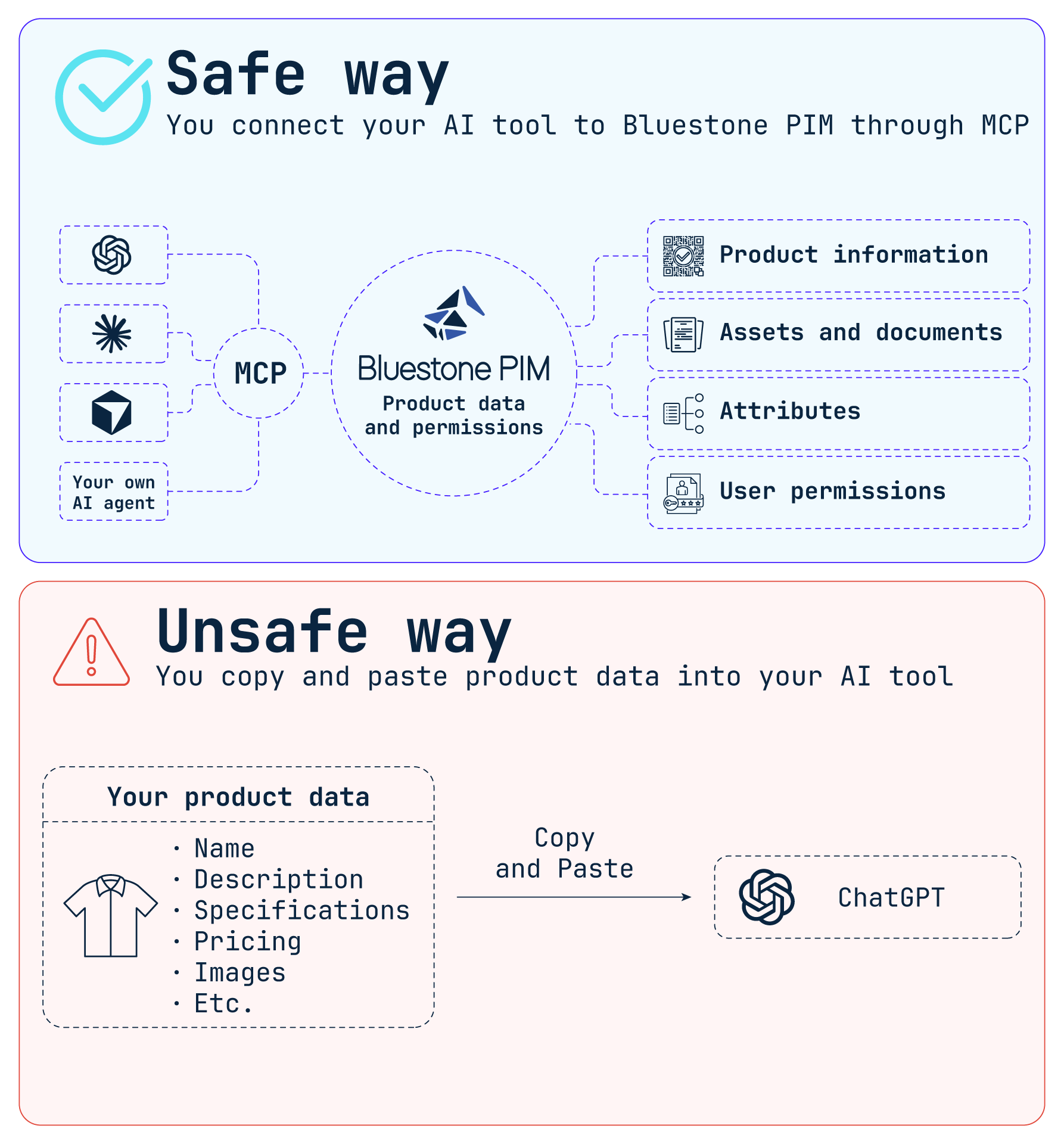
Bluestone PIM's MCP server uses an OAuth 2.1-based sign-in with PKCE. You add the server to a compatible client, such as Claude, ChatGPT, Cursor, VS Code or Codex, then sign in with your Bluestone PIM account in the browser and approve access. No Management API key, client secret or copied bearer token goes into the client configuration. The step-by-step guide to MCP and product data walks through the connection itself.
Don't confuse it with Bluestone PIM's separate docs MCP server. That one helps developers explore the API reference from their code editor. It needs no sign-in and can't reach your product data unless someone gives it their own API token, so treat any token used there as a secret and test against the Test environment first.
Pro tip: Ask which identity the agent will use before anyone asks which model. "Who is this agent, and who answers for its changes?" is the question your security review will start with.
How Do You Limit What an AI Agent Can Change in Your PIM?
You limit what an AI agent can change in your PIM by giving it no more access than the person it acts for, and by controlling when it's allowed to write.
| Before: agent on a shared admin key | After: agent on user permissions |
|---|---|
| Agent can do anything the admin account can do | Agent can only do what the signed-in user is authorised to do |
| Changes logged as a service account | Changes attributed to a named person |
| Every tool available from day one | Tools introduced gradually, with clear descriptions and testing |
| Writes go straight to live data | Client asks for approval before saving changes |
Bluestone PIM helps engineering teams apply least privilege to AI agents by reusing the permissions they already manage. An agent connected through the Bluestone PIM MCP server inherits the signed-in user's rights, so a category manager's agent can't touch what the category manager can't touch. There's no second permission model to build and audit.
One detail matters here. The server issues a single OAuth scope, with no separate read and write scopes to switch off. That makes the user's Bluestone PIM permissions the real boundary, so give each agent a dedicated user or role with only the permissions its task needs.
Reach matters too. Bluestone PIM is headless, with 1200+ API endpoints behind it, so its MCP server goes deep into the catalogue. Agents can create, update, archive and delete products, variants, attributes, catalogues, categories, assets and relations, all within the user's permissions. Some PIM MCP servers only find and read a product (the comparison of which PIM platforms support MCP covers the differences). Wider reach is exactly why the permission boundary has to be strict.
Bluestone PIM's MCP documentation sets out a five-step loop for every change, and it works with any PIM:
-
Read. Start with read-only tools and pull exact record IDs and current values. Never let the agent guess a record from a similar name.
-
Plan. Ask for the proposed change in plain language: which records, old and new values, and how many records it touches.
-
Confirm. Approve that specific change, and approve again if the target or the values shift.
-
Execute. For a large change, run it on one record in a Test environment first.
-
Verify. Re-read the records and compare them with the plan before calling the job done.
A written plan is a review step, not a dry run. Pair it with approval prompts in your AI client wherever they're supported, and add new write tasks one at a time.
How Do You Trace and Undo What an Agent Changed?
You trace what an agent changed through the PIM's change history, which only works if each agent acts as an identifiable user. When five agents share one service account, the history tells you that something changed. It can't tell you whose agent did it, or why.
Bluestone PIM's MCP server acts as the signed-in user, so an agent's changes run under a named account instead of a shared service account. Agents can read product history through MCP too, which is useful when you ask an agent to check its own work. What history shows depends on what each operation records, so check important changes in Bluestone PIM itself.
Undoing is the harder half. A single wrong instruction in a bulk update can touch thousands of SKUs. Today, change history helps your team find which records were affected. Bluestone PIM is developing rollback for bulk updates, so teams can restore previous values across thousands of products without fixing each one by hand. Until then, keep bulk agent writes small and approved, and export the current values before any change that would be hard to reverse.
For the accuracy side of the same problem, read how to prevent AI hallucinations in product data.
What Should You Ask Before Connecting an MCP Server to Your PIM?
Before connecting an MCP server to your PIM, ask the vendor eight questions. If they can't answer one clearly, treat it as a no.
-
Does the agent sign in through OAuth as a named user, or with a shared API key?
-
Does the agent inherit that user's existing permissions, or does it need its own access model?
-
Can every change be attributed to an individual in the change history?
-
Which operations can agents perform: read only, or read and write?
-
How are new MCP tools introduced and tested before agents can call them?
-
Can we bring our own LLM provider and API keys, including an existing Azure set-up?
-
Where is product data processed and stored, and which security certifications cover the platform?
-
How do we find and correct a bad bulk update?
Here's how Bluestone PIM answers the last three. Bluestone PIM is LLM-neutral and works with different providers and models, including your own API keys. Its security framework includes SOC 2 Type II and ISO 27001, with regional data residency in the EU, North America and APAC. Change history covers bulk updates today, with rollback in development.
One more check: make sure you're connecting the vendor's official server. Bluestone PIM Labs hosts an unofficial, community-built MCP server for experiments. Labs projects come with no SLA or support, so use the official Bluestone PIM MCP server for production catalogues.
If you're evaluating platforms, this checklist for evaluating PIM software before AI agents expose the gaps covers the wider architecture questions.
Stadium doubled its B2B revenue with the same headcount on Bluestone PIM. Agents are how teams push that kind of scale further, which is why the connection has to be governed first. Bluestone PIM's MCP server gives agents developer-level reach across your catalogue, while every agent signs in as a real user, works inside that user's permissions and leaves a change history.